


New article
Recently updated
Setting the Audit Frequency

The Audit Frequency is a numerical value assigned to an Entity-Process which corresponds to how often the Entity-Process is to be audited. By default, the Audit Frequency is in months, so if an Entity-Process has an Audit Frequency of 6, that Entity-Process will need to be audited every 6 months.
Setting the Audit Frequency:
From the Home screen, click Universe and then select Client Universe
Now you should see a Matrix Representation of all of your Org Units, similar to the image below:
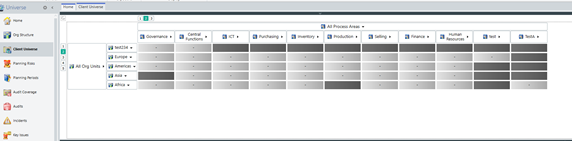
Navigate to the Entity Process that you wish to change and then click on the Entity Process Cell
The view below the Org matrix should now be populated with the Entity-Processes belonging to the previously chosen cell. Click on any of the Processes to bring up their respective Properties Panel.
Then click on the field Audit Frequency within Properties and edit the frequency as shown below:
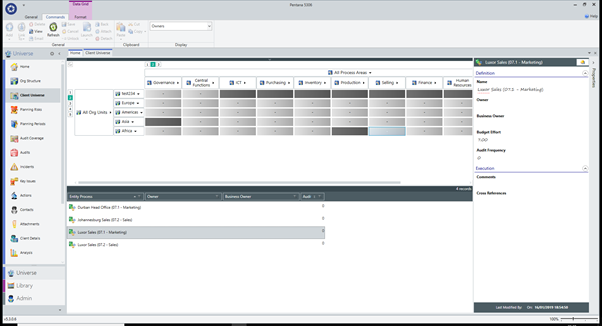
Once all changes have been made to the audit frequency, click the save icon to ensure all changes have been saved.