


New article
Recently updated
Creating an Incident

What is an Incident?
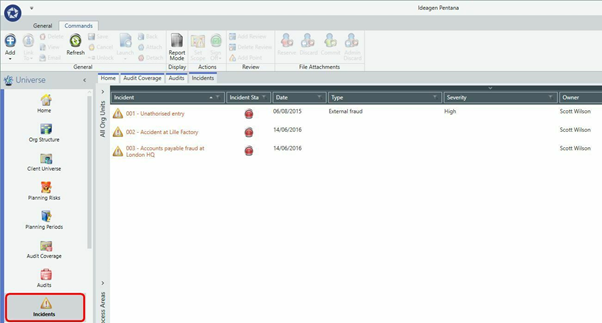
An Incident is any type of significant unintended event that has occurred within your business and needs to be raised within your organization. Incidents can be linked within multiple entities and processes, contain multiple risks and have multiple actions to mitigate said risks. Reviews and Review Points can also be mapped to any Incident.
Incidents and are managed independently of Audits; they do not form a direct part of any audit work and they cannot be checked out for offline working. Incidents can also be viewed in the [Incident Tracker] tab which provides analysis of Incidents across the universe.
Incident Fields
*the following fields are mandatory
|
*Reference |
An auto-generated globally-unique reference number for the Incident |
|
Title |
A short, descriptive, title for the Incident |
|
*Date |
Date incident raised |
|
Scope |
The Entity/Process cell(s) affected by the Incident. This may cut across multiple Entities and is therefore akin to the Audit Scope behaviour. |
|
Description |
A description of the Incident. Rich-text to support full formatting. |
|
Category |
A single-select segmentation allowing additional optional categorization of the Incident for analysis purposes |
|
Type |
A single-select segmentation that indicates the nature of the incident, such as Near Miss and Loss. |
|
Severity |
A single-select segmentation describing either the severity or urgency with which the Incident needs to be addressed. E.g. High, Medium, Low or Immediate, 3-6 months etc. |
|
Owner |
The Person ultimately responsible for the management of the Incident. An incident will be visible to its Owner, anyone with permissions to read all incidents, anyone with permission to read in assigned Entity Process scope. |
|
Interested Parties |
Additional Person(s) to be kept informed of the progress of the Incident |
|
Departments |
Link to existing [Audit] Department |
|
Incident State |
Set the Incident to Open/Completed/Approved and Closed. |
|
Value |
A numeric value field of the total monetary amount associated with the Incident. |
|
Outcome |
A single-select segmentation indicating the ultimate outcome of the Incident, e.g. Insurance Claim, Legal Action. |
|
Outcome Comments |
A free-text RTF field for the entry of detailed comments describing the final outcome of the Incident |
|
Cross References |
List/link to cross references, as per normal rules. |
Raising an Incident:
- Starting from the [Home] screen, scroll down and select [Incidents] in the [Universe] navigation pane.
- Right click in the data pane and go to [Add] then [Add Incident] or click [Add] then [Add] in the left side of the Ribbon.
- The "Properties" panel will appear on the right hand side and you can input data as required.
- Click Save at the top right of the "Properties" panel.