


New article
Recently updated
Generating reports from templates

Who is this article for?who need to generate reports from templates.
No special access or permissions are required.
Ideagen Disclose offers two types of reports: Audit Reports that run exclusively from the Audit Reports screen, and standard Reports that can be used in any Data Grid.
Understanding report types
There are two types of report:
- Audit Report - designed specifically to only run from your Audit Reports screen
- Report - can be used in any Data Grid
Reports are created and stored in the audit report templates and reports section of the library. Reports are available for their relevant Data Grid, and when you wish to export data into a report template, you will have access to the reports in the library.

Exporting data into a standard report
The method for populating a report template is dependent on the report context. Reports can be populated using the ribbon command while audit reports must be added to the relevant audit screen.
To export data into a standard report:
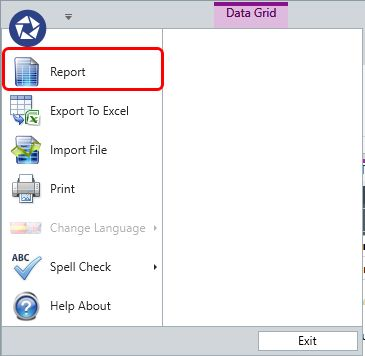
- Open the Pentana Icon (top left of screen).
- Select Report from the menu.
- Select the template you wish to populate from the report template pick list.
- Click OK.
The data will export into the report template.
Note: For Audit Reports, see the audit report article.