


New article
Recently updated
Managing segmentations

Who is this article for?
Administrators needing to manage segmentations.
Administrator permissions are required.
Segmentations are pick lists used throughout the system to provide drop-down options in property fields, stored as true links that reflect changes across all data, including closed audits.
Overview
Segmentations control pick lists system-wide, providing drop-down options in property fields. They are true links, meaning:
- Changing a pick list value updates it everywhere, including closed audits.
- You cannot delete values in use; instead, deactivate them using the Active flag.
Set true orders only to enforce non-alphanumeric sorting; otherwise, lists sort alphabetically by default.
Some segmentations (e.g. Active States) have fixed items for system use—you can edit terms but not add or delete items.
Segmentation guidance lets you add descriptions shown as tool-tips when hovering over drop-down items.
Use re-order to quickly adjust list order; this order controls data grid sorting and is not alphanumeric.
Relevant segmentations display values as coloured blocks alongside text in the data grid.
Working with thresholds
Segmentation thresholds (e.g., risk rating, control rating, audit rating, planning risk rating, due date periods) are position-sensitive. The lowest value must come first; note that for frequency, the lowest value is the highest number (i.e., least frequent).
For example, if the control rating threshold starts at 100, all values below 100 get the first colour. A second threshold at 75 won't work, as the system only checks for values greater than 100 after the first.
Editing segmentations
To edit segmentations:
- Go to Admin.
- Select Segmentations.
- Click to select the segmentation. Its values will be shown in the adjacent window on the data grid.
- Click into this adjacent window.
- Select add from the ribbon, or right-click and select add from the drop-down menu.
- Within the properties window, complete the fields:
- Order - enter a number to represent where in the pick list you wish the item to appear
- Name (Mandatory) - enter the name of the pick list item
- Active - select whether this item is currently active. If it is not, it will not appear within the pick list
- Default - assign a value from the pick list to be used as the default value (only one can be assigned)
- Colour - assign a colour to a pick list item, for example to signify importance and for reporting purposes (e.g. Audit Rating)
- Description - enter a description to accompany the pick list item
- Click Save.
Deleting a segmentation value
To delete a segmentation value:
- Right-click the segmentation item that you wish to delete.
- Select Delete from the menu.
Note
You cannot delete a pick list item that is active and currently in use. A pick list may be set as inactive, which will prevent the value from being selected.
Segmentation types
Account Balances
List of Account Balances - examples being Debt, Credit, Dr, (Cr), Dr/(Cr).
Account Categories
List of Action Categories - examples being Process Improvement, Procedure Change, Application Change, Physical Action, Planning Documents, File Notes, Testing Schedules, Other.
Account Group Types
List of Account Group Type - examples being Assets, Liabilities, Equity, Revenue, Expenses.
Account Sub Groups
List of Account Sub Groups.
Action Priorities
List of Action Priorities - examples being Very High, High, Medium, Low.
- Order
- Action Priority name
- Type (Result Types - Problem, Alert, Normal)
- Active
- Default
- Colour
- Description

Action Resolutions
List of Action Resolutions - examples being Not Actioned, Actioned, Reviewed, Cleared, Not Relevant.
Action Types
List of Action Types - examples being Tracked, Not Tracked Transferred - used to filter on Track Actions and Action Tracker screens - edits allowed but you may not add or delete records.
Action Update States
List of Action Update States - examples being Process Pending, Submitted, Accepted, and Rejected.
Active States
List of Active States - examples being Draft, Live and Closed - edits allowed but you may not add or delete records.
Answer Types
List of Answer Types - examples being Answered, Unanswered and Not Required - edits allowed but you may not add or delete records.
Assertions
List of Assertions - claims made in relation to the accuracy of financial statements and the organisation's control over reporting - examples being Occurrence, Completeness, Accuracy, Cut-Off, Classification, Existence, Rights and Obligations, Valuation, Other.
Assessment Types
List of Assessment Types - examples being Internal, External - edits allowed but you may not add or delete records.
Attachment Categories
List of Attachment Categories - examples being Examples, General, Audit, Step, Test.
Audit Committees
List of Audit Committees - examples being N/A, Q1 2018, Q2 2018.
Audit Periods
List of Audit Periods - examples being 2010, 2011, 2012, 2013, 2014, 2015 (set one to default value).
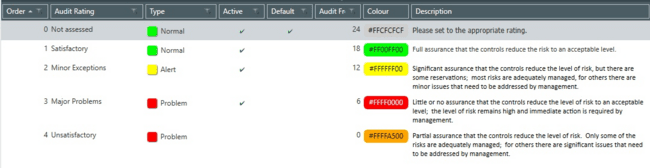
Audit Ratings
List of Audit Ratings - examples being Not assessed, Satisfactory, Minor Exceptions, Major Problems, Unsatisfactory.
- Order
- Audit Rating name
- Type (Result Types - Problem, Alert, Normal)
- Audit Frequency (months)
- Active
- Default
- Colour
- Description
Audit Report Categories
List of Audit Report Categories - examples being Draft, Final, Issued.
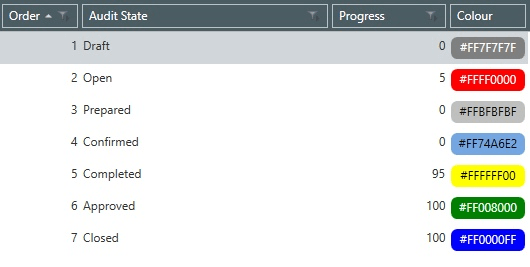
Audit States
List of Audit States - examples being Draft, Open, Prepared, Confirmed, Completed, Approved, Closed.
- Order
- Audit State name
- Progress - threshold
- Colour
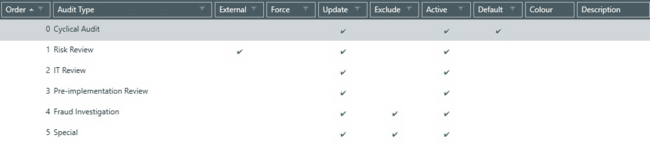
Audit Types
List of Audit Types - examples being Cyclical Audit, Risk review, IT Review, Pre-implementation review, Fraud Investigation, Special.
- Order
- Audit Type name
- External - if set to External then all the Risk and Control assessments within the Audit will be stored as External Assessments
- Exclude - allows whether to include Audits of that Type when working out when an Entity was last audited (during scheduling), e.g. you may exclude Follow Up Audits
- Update - setting determines whether the application prompts (upon completing an Audit) whether Audit should update the Entity ORCT
- Force - force the update of the parent ORCT (no longer optional)
- Active
- Default
- Colour
- Description
With both the Update and Force settings set to true, the user is forced to update the Entity and skips the dialogue window. (In this case the Include Results and Include Assessments flag comes from System Settings and everything that would have been shown in the dialogue window is selected by default).
Candidate States
List of Candidate States - examples being Candidate, Confirmed - edits allowed but you may not add or delete records.
Client Industries
List of Client Industries - examples being Banking, Entertainment, Farming, Insurance, Manufacturing, Motor, Professional, Services, Retail.
Control Assessment Categories
List of Control Assessment Categories - examples being Quarterly, Preliminary, After Testing.
Control Categories
List of Control Categories - examples being Recording, Cut-Off, Authorisation, Reconciliation, Matching, Physical Access, Duty Segregation, Monitoring, Cancellation, System Validation, Data Access, Application Implementation, Input Procurement, Policy, Inspection, Review, One-for-one Checking, Sequence Checking, Information, Back-up, Competence, Expert Advice.
Control Components
List of Control Components - examples being Control Environment, Risk Assessment, Control Activities, Information and Communication and Monitoring Activities.
Control Frequencies
List of Control Frequencies - examples being Daily, Weekly, Monthly, Quarterly, As required, Ongoing, One-off, Annually.
Control Importances
List of Control Importances - examples being Key, Secondary.
- Order
- Control Importance name
- Outcome Type (Included/Excluded)
- Certification - when true, makes the software require that Controls with this importance provide a Certification before it can be signed off. Used in tandem with the Certification System Settings
- Active
- Default
- Colour
- Description
Control Principles
List of Control Principles - examples being Demonstrates commitment to integrity and ethical values, Exercises oversight responsibility, Establishes structure, authority, and responsibility.
- Order
- Control Principle name
- Component (One to One link to Control Component)
- Active
- Default
- Colour
- Description
Control Ratings
List of Control Ratings - examples being Ineffective, Partially Effective, Effective.
- Order
- Control Rating name
- Control Rating
- Value - threshold values
- Active
- Default
- Colour
- Description

Control Types
List of Control Types - examples being Manual, Automated, Hybrid.
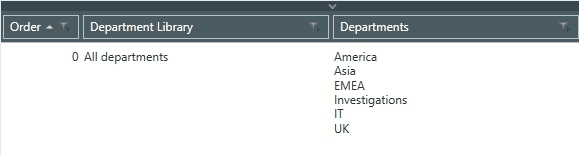
Department Libraries
List of Department Libraries - examples being 'All Departments'.
- Order
- Department Library name
- Departments (One to many link to Departments)
- Active
- Default
- Colour
- Description
Departments
List of Departments - examples being IT, Finance, Warehouse, HR, Marketing, Accounts.
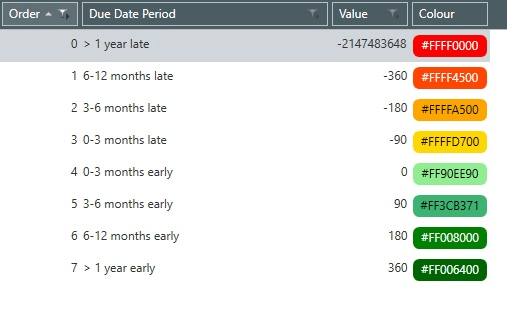
Due Date Periods
List of Due Date Periods - examples being Periods configured - edits allowed but you may not add or delete records.
Due Date States
List of Due Date States - examples being Not Due/Early, Overdue/Late and Unknown - edits allowed but you may not add or delete records.
Entity Categories
List of Entity Categories - examples being IT, Head Office, Branch, IT Centre, Sales Centre, Warehouse, Other.
Entity Types
List of Entity Types - examples being IT, Finance, Warehouse, HR, Marketing, Accounts.
Finding Categories
List of Finding Categories - examples being IT, Control Execution, Control Design, Fraud, Error, Information Availability, Unusual Data.
Finding Responses
List of Finding Responses - examples being Agreed, Partially Agreed, Disagreed.
- Order
- Finding Response name
- Type (Result Types - Problem, Alert, Normal)
- Active
- Default
- Colour
- Description

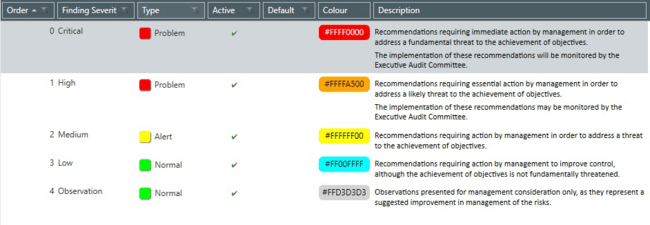
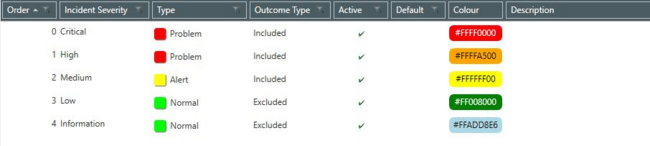
Finding Severities
List of Severities - examples being Critical, High, Medium, Low, Observation.
- Order
- Finding Severity name
- Type (Result Types - Problem, Alert, Normal)
- Outcome Type (Included / Excluded)
- Active
- Default
- Colour
- Description
From Date Periods
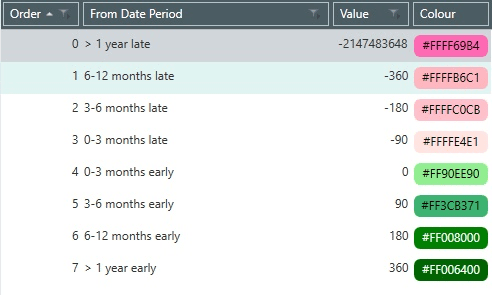
List of From Date Periods - examples being From Date Periods - edits allowed but you may not add or delete records.
From Date States
List of From Date States - examples being Not Due/Early, Overdue/Late, Unknown - edits allowed but you may not add or delete records.
Help Item Types
List of Help Item Types - examples being Guidance, Example and Note - edits allowed but you may not add or delete records.
Incident Categories
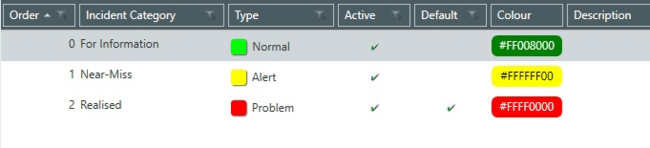
List of Incident Categories - examples being For Information, Near-Miss, Realised.
- Order
- Incident Category name
- Type (Result Types - Problem, Alert, Normal)
- Active
- Default
- Colour
- Description
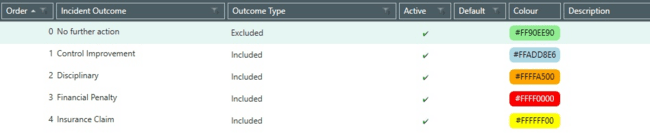
Incident Outcomes
List of Incident Outcomes - examples being No Further Action, Control improvement, Disciplinary, Financial Penalty, Insurance Claim.
- Incident Outcome name
- Outcome Type (Included / Excluded)
- Active
- Default
- Colour
- Description
Incident Severities
List of Incident Severities - examples being Critical, High, Medium, Low, Information.
- Order
- Incident Severity name
- Type (Result Types - Problem, Alert, Normal)
- Outcome Type (Included / Excluded)
- Active
- Default
- Colour
- Description
Incident Types
List of Incident Types - examples being Internal Fraud, External fraud, Employment Practices and Workplace Safety, Clients, Products and Business Practices, Damage to Physical Assets, Business disruption and system failures, Execution Delivery and Process management.
Key Issue Categories
List of Key Issue Categories - examples being No Further Action, Control improvement, Disciplinary, Financial Penalty, Insurance Claim.
Key Issue Resolutions
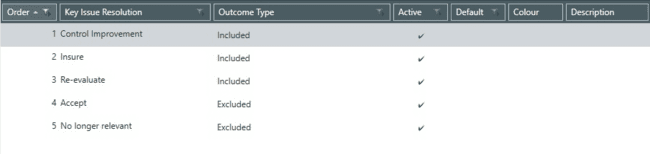
List of Key Issue Resolutions - examples being Control Improvement, Insure, Re-evaluate, Accept, No longer relevant.
- Order
- Key Issue Resolution name
- Outcome Type (Included, Excluded)
- Active
- Default
- Colour
- Description
Movement States
List of Movement States - examples being Unchanged, Increasing, Decreasing - edits allowed but you may not add or delete records.
Note Categories
List of Note Categories - examples being Meeting, Call, File Note, General.
Objective Categories
List of Objective Categories - examples being Principal Risks, Record, Produce, Obtain, Safeguard, Correct, Monitor, Secure, Identify, Supply, Test, Plan, Manage.
- Order
- Objective Category name
- Type (Objective Category Types - Principal / Operational)
- Active
- Default
- Colour
- Description

Objective Category Types
List of Objective Category Types - Principal / Operational - edits allowed but you may not add or delete records.
Objective Libraries
List of Objective Libraries - examples being Pentana Principal Risks, Pentana Risks, Controls and Tests.
Outcome Types
List of Outcome Types - examples being Included or excluded - edits allowed but you may not add or delete records.
Outcomes
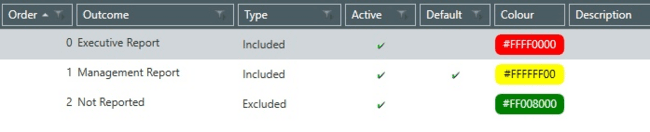
List of Outcomes - examples being Executive Report, Management Report, Not reported.
- Order
- Outcome name
- Type (Outcome Type - Included, Excluded)
- Active
- Default
- Colour
- Description
Permission Types
List of Permission Types - examples being Application, Client Universe, Entity and Audit - edits allowed but you may not add or delete records.
Person Jobs
List of Person Jobs - examples being Director, HR Manager, Oracle DBA, Payroll Manager, Accounts Payable Manager, Accounts Receivable Manager, Financial Director, Financial Controller, Human Resources Manager, Stores Manager, Buying Manager, Expenses Manager, Cashiers Manager, Sales Manager, Tax Manager, Financial Accountant, IT Manager.
Person Types
List of Person Types - examples being Staff and Client - edits allowed but you may not add or delete records.
- Order
- Person Type
- Colour
- Time Sheet

Plan States
List of Plan States - examples being Planned, Added and Removed - edits allowed but you may not add or delete records.
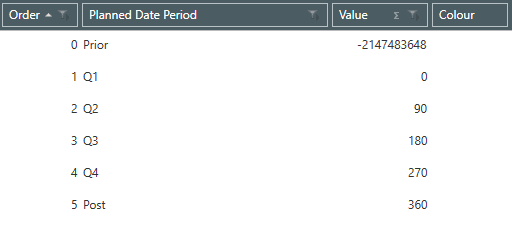
Planned Date Periods
List of Planned Date Periods - examples being Periods configured - edits allowed but you may not add or delete records.
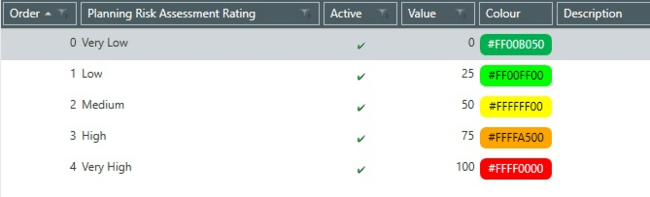
Planning Risk Assessment Ratings
List of Planning Risk Assessment Ratings - examples being Very Low, Low, Medium, High, Very High.
- Order
- Planning Risk Assessment Ratings name
- Value - threshold values
- Active
- Colour
- Description
Planning Risk Categories
List of Planning Risk Categories - examples being Strategic, Regulatory, Corporate, Key.
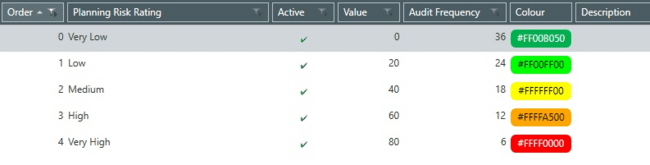
Planning Risk Ratings
List of Planning Risk Ratings - examples being Very Low, Low, Medium, High, Very High.
- Order
- Planning Risk Ratings name
- Value - threshold values
- Audit Frequency (months)
- Active
- Default
- Colour
- Description
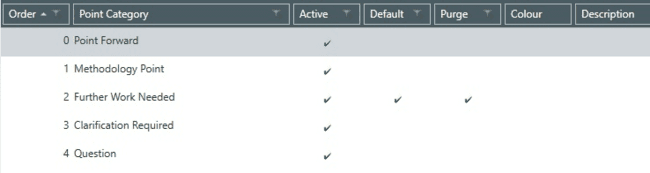
Point Categories
List of Point Categories - examples being Point Forward, Methodology Point, Further Work Needed, Clarification Required, Query.
- Order
- Point Category name
- Purge - (True / False)
- Active
- Default
- Colour
- Description
Point Severities
List of Point Severities - examples being Critical, High, Medium, Low, Observation.
Problem Categories
List of Problem Categories - examples being Executive Report, Management Report, Not reported.
Problem Resolutions
List of Problem Resolutions - examples being Executive Report, Management Report, Not Reported.
- Order
- Problem Resolution name
- Outcome Type - Included, Excluded
- Active
- Default
- Colour
- Description

Process Types
List of Process Types - examples being Fulfillment, Back Office, Customer, Due Diligence.
Question Categories
List of Question Categories.
Question Types
List of Question Types - examples being None, Tick One, Tick Many, Boolean, Integer, Decimal, Date and Text.
Questionnaire Families
List of Questionnaire Families.
Questionnaire States
List of Questionnaire States - examples being Open, Tailoring Completed, Tailoring Approved, Completed and Approved.
Report Template Categories
List of Report Template Categories - examples being Audit, Person, Universe.
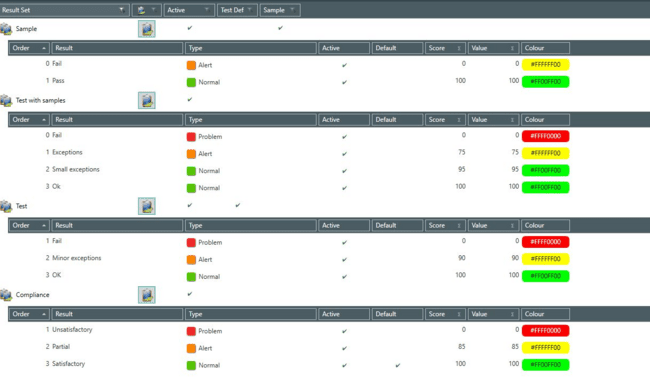
Result Sets
The Result Sets show the possible outcomes for Tests and Samples. They allow you to create a library so that when, for example a Test is completed, the outcome may be selected from a pick list without having to re-enter the information each time.
Note
You cannot delete a result set that is active and in use.
Result Types
List of Result Types - examples being Normal, Alert and Problem - edits allowed but you may not add or delete records.
Retain User Roles
List of Retain User Roles - examples being System Administrator, Wallchart and Web Individual-Read Only, Wallchart and Web Individual-Edit Own Planning, Wallchart and Web Job Manager, Wallchart and Web Planner.
- Order
- Retain User Role name
- Retain ID
- Active
- Default
- Colour
- Description
Review States
List of Review States - examples being Not Reviewed, Reviewed, Changed - edits allowed but you may not add or delete records.
Risk Assessment Categories
List of Risk Assessment Categories - examples being Quarterly Review, Preliminary, After Testing.
Risk Categories
List of Risk Categories - examples being Principal Risks, Completeness, Accuracy, Validity, Maintenance, Access, Efficiency, Operational, Damage or loss, Safety, Timeliness, Legal compliance.
Risk Ratings
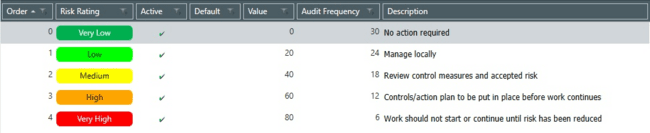
List of Risk Ratings - examples being Very Low, Low, Medium, High, Very High.
- Order
- Risk Rating name
- Value - threshold values
- Audit Frequency (months)
- Active
- Default
- Colour
- Description
Risk Types
List of Risk Types.
- Order
- Risk Type name
- Outcome Type - (Included/Excluded)
- Default
- Colour
- Description
Sample Categories
List of Sample Categories.
Scope States
List of Scope States - examples being In Scope, Out of Scope - edits allowed but you may not add or delete records.
Sign Off States
List of Sign Off States - examples being Open, Prepared, Confirmed, Completed, Approved - edits allowed but you may not add or delete records.
Sub Processes
List of Sub Processes.
- Order
- Process (grouped by)
- Sub Process name
- Default
- Colour
- Description

Test Types
List of Test Types - examples being Test, Test of Control, Substantive Test, SOX Test.
The Certification flag here is used to denote which Tests can be brought into an Audit using the Get From Library or Get From Entity feature. If the Audit has an Audit Type whose Certification flag is true, only Tests of Test Types whose Certification flag is also true, and which descend from Controls whose Control Importance Certification flag is set to true will be proposed to be brought into the Audit.
Time Sheet Components
List of Time Sheet Components - examples being Planning, Fieldwork, Reporting.
Time Sheet Tasks
List of Time Sheet Components - examples being Vacation, Training.
User Types
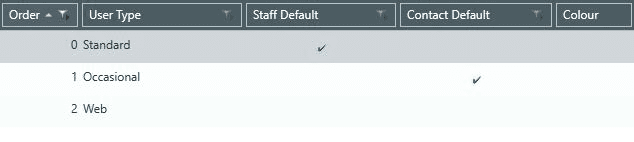
List of User Types - examples being Standard, Occasional, Web.
- Order
- User Type
- Staff Default
- Contact Default
- Colour
View Categories
List of View Categories - examples being General, Manager, Personal.
Work Plan Libraries
List of Work Plan Libraries - examples being Ideagen Internal Audit Aura Methodology.
Work Plan Sections
List of Work Plan Sections - examples being Audit Management.