


New article
Recently updated
Assigning roles to staff members

Who is this article for?
Administrators responsible for managing staff.
Administrator permissions are required.
You can assign roles to staff members to control their access and permissions across the application, including universe, entity, and audit levels.
Assigning roles to a staff member
To assign roles to a staff member:
- Select the staff member you want to assign roles to.
- Within the properties panel, select at least one of the Application roles.
- Select one Default and one Maximum from the Client Universe.
- Select one Default and one Maximum for the Entity.
- Select one Default and one Maximum for the Audit.
Important
At least one staff member must always be assigned to the User Administrator role. If this is removed completely, no new roles can be configured and you will need to contact Pentana Support for assistance.
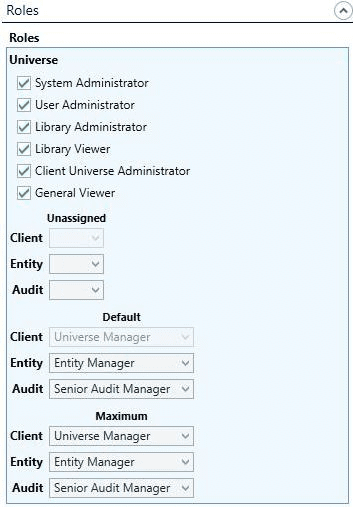
Role types
Audit roles
Audit roles control access to audit management and performance:
- Senior Audit Manager - for managing all aspects of an audit
- Audit Manager - for cross-over of managerial and performance of an audit
- Auditor - for performance of an audit
- Junior Auditor - for limited performance of an audit
- Business Auditor - for business participating in external audits
- Audit Viewer - for view-only access to an audit
Client roles
Client roles control access within a specific client:
- Universe Manager - for managing the audit universe within a client
- Universe Departmental User - for working within a department of the universe
- Universe User - for working as an auditor within a client
- Universe Business User - for business user access to the universe
- Universe Viewer - for view-only access within a client
Entity roles
Entity roles control access to risk register management:
- Entity Manager - for managing the risk register for an entity
- Entity Business Manager - for business managing the risk register for an entity
- Entity User - for owning risk register items within an entity
- Entity Business User - for business owning risk register items within an entity
- Entity Viewer - for view-only access within an entity
Universe roles
Universe roles control access to system-wide configuration and management functions:
- System Administrator - for configuring segmentations, terminology, and roles
- User Administrator - for provisioning people with authorisation to use the application
- Library Administrator - for maintaining the library of templates
- Library Viewer - for viewing library templates
- Client Universe Administrator - for managing clients
- General Viewer - for general access to application functionality
Unassigned roles
You can set an optional default role when a person is not specifically assigned to an entity or audit:
- Client Universe - available only in multi-client mode
- Entity - when not assigned to an Entity
- Audit - when not assigned to an Audit
If blank, a system value can be configured or it will default to the person's default role.
Varying roles by audit or entity
Staff roles can be adjusted individually for each audit or client entity.
Each person has a Default and Maximum role at client, entity, and audit levels. For instance, someone usually assigned as Auditor may be allowed to act as Senior Audit Manager on specific audits. Their role starts as default but can be changed as needed.